AP8050TN-HD, Huawei AP8050TN-HD Access Point, 802.11ac Wave2/Smart Antenna/Indoor
SKU: AP8050TN-HD · MPN: AP8050TN-HD · Category: Networking
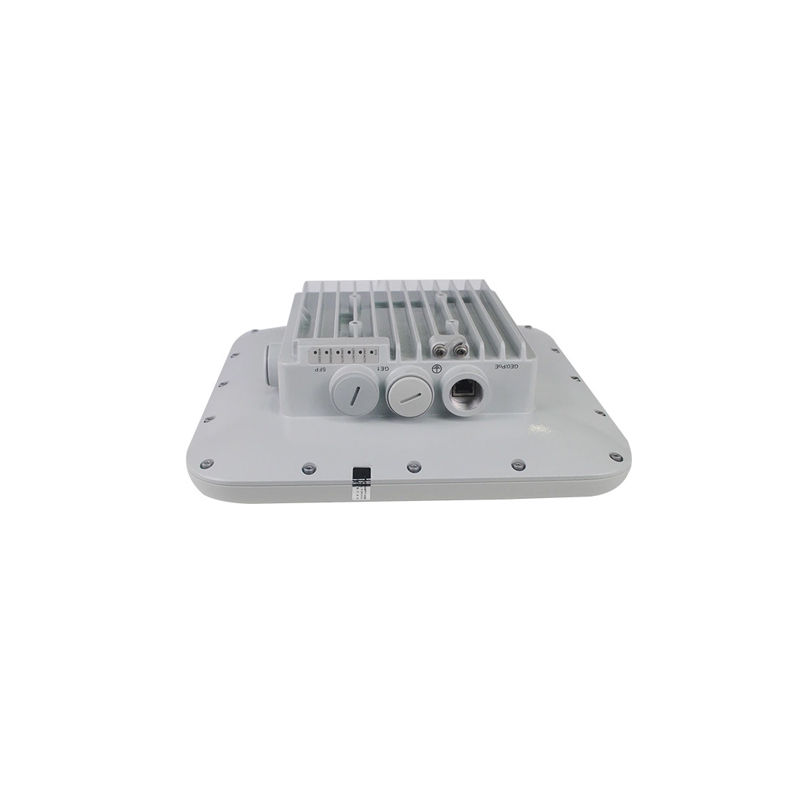
Huawei AP8050TN-HD, 802.11ac Wave 2 Access Point, Built-in high-density smart antennas
Specifications
| BYOD | Note: The AP supports bring your own device (BYOD) only in Fit AP mode. Identifies the device type according to the organizationally unique identifier (OUI) in the MAC address. Identifies the device type according to the user agent (UA) information in an HTTP packet. Identifies the device type according to DHCP options. The RADIUS server delivers packet forwarding, security, and QoS policies according to the device type carried in the RADIUS authentication and accounting packets. |
|---|---|
| Weight | 3.23 kg |
| Altitude | – 60 m to 5,000 m |
| Bluetooth | BLE4.1 |
| Power input | PoE power supply: in compliance with IEEE 802.3at |
| Antenna gain | 2.4G: 7dBi 5G-1: 9dBi 5G-2: 9dBi |
| Antenna type | Built-in dual-band directional antenna 2.4G: horizontal 40 °, vertical 40 ° 5G-1: horizontal 27 °, vertical 27 ° 5G-2: horizontal 27 °, vertical 27 ° |
| QoS features | Priority mapping and packet scheduling based on a Wi-Fi Multimedia (WMM) profile to implement priority-based data processing and forwarding WMM parameter management for each radio WMM power saving Priority mapping for upstream packets and flow-based mapping for downstream packets Queue mapping and scheduling User-based bandwidth limiting Adaptive bandwidth management (automatic bandwidth adjustment based on the user quantity and radio environment) to improve user experience Smart Application Control (SAC) in Fit AP mode Airtime scheduling Support for Microsoft Lync APIs and high voice call quality through Lync API identification and scheduling |
| LED indicator | Indicates the power-on, startup, running, alarm, and fault states of the system. |
| WLAN features | Compliance with IEEE 802.11a/b/g/n/ac/ac Wave 2 Maximum rate: 2.134 Gbit/s Maximum ratio combining (MRC) Space time block code (STBC) Cyclic Delay Diversity (CDD)/Cyclic Shift Diversity (CSD) Beamforming MU-MIMO Low-density parity-check (LDPC) Maximum-likelihood detection (MLD) Frame aggregation, including A-MPDU (Tx/Rx) and A-MSDU (Tx/Rx) 802.11 dynamic frequency selection (DFS) Short guard interval (GI) in 20 MHz, 40 MHz,and 80 MHz modes Priority mapping and packet scheduling based on a Wi-Fi Multimedia (WMM) profile to implement prioritybased data processing and forwarding Automatic and manual rate adjustment WLAN channel management and channel rate adjustment Automatic channel scanning and interference avoidance Service set identifier (SSID) hiding Signal sustain technology (SST) Unscheduled automatic power save delivery (U-APSD) Control and Provisioning of Wireless Access Points (CAPWAP) in Fit AP mode Automatic login in Fit AP mode Extended Service Set (ESS) in Fit AP mode Wireless distribution system (WDS) in Fit AP mode Mesh networking in Fit AP mode Multi-user CAC Hotspot2.0 802.11k and 802.11v smart roaming 802.11r fast roaming ( ≤ 50 ms) WAN authentication escape. In local forwarding mode, this function retains the online state of existing STAs and allows access of new STAs when APs are disconnected from an AC, ensuring service continuity. |
| Interface type | 1 x 10/100/1000M self-adaptive Ethernet interface (RJ45 x 2) 1 x Management console port (RJ45) 1 x SFP optical port Note: The optical port supports single-fiber bidirectional optical modules. |
| Power increment | 1 dBm |
| Location service | Note: The AP supports the locating service only in Fit AP mode. Locates tags manufactured by AeroScout or Ekahau. Locates Wi-Fi terminals. Works with eSight to locate rogue devices |
| Network features | Compliance with IEEE 802.3ab Auto-negotiation of the rate and duplex mode and automatic switchover between the Media Dependent Interface (MDI) and Media Dependent Interface Crossover (MDI-X) Compliance with IEEE 802.1q SSID-based VLAN assignment VLAN trunk on uplink Ethernet ports Management channel of the AP uplink port in tagged and untagged mode DHCP client, obtaining IP addresses through DHCP Tunnel data forwarding and direct data forwarding STA isolation in the same VLAN Access control lists (ACLs) Link Layer Discovery Protocol (LLDP) Uninterrupted service forwarding upon CAPWAP channel disconnection in Fit AP mode Unified authentication on the AC in Fit AP mode AC dual-link backup in Fit AP mode Network Address Translation (NAT) in Fat AP mode IPv6 in Fit AP mode Soft Generic Routing Encapsulation (GRE) IPv6 Source Address Validation Improvements (SAVI) Multicast Domain Name Service (mDNS) gateway protocol: supports AirPlay and AirPrint service sharing between users of different VLANs |
| Security features | Open system authentication WEP authentication/encryption using a 64-bit, 128-bit, or 152-bit encryption key WPA/WPA2-PSK authentication and encryption (WPA/WPA2 personal edition) WPA/WPA2-802.1X authentication and encryption (WPA/WPA2 enterprise edition) WPA-WPA2 hybrid authentication WPA/WPA2-PPSK authentication and encryption in Fit AP mode WAPI authentication and encryption Wireless intrusion detection system (WIDS) and wireless intrusion prevention system (WIPS), including rogue device detection and countermeasure, attack detection and dynamic blacklist, and STA/AP blacklist and whitelist 802.1X authentication, MAC address authentication, and Portal authentication DHCP snooping Dynamic ARP Inspection (DAI) IP Source Guard (IPSG) 802.11w Protected Management Frames (PMFs) Application identification |
| Spectrum analysis | Note: The AP supports spectrum analysis only in Fit AP mode. Identifies interference sources such as baby monitors, Bluetooth devices, digital cordless phones (at 2.4 GHz frequency band only), wireless audio transmitters (at both the 2.4 GHz and 5 GHz frequency bands), wireless game controllers, and microwaves. Works with eSight to perform spectrum analysis on interference sources. |
| Operating humidity | 0% to 100% (non-condensing) |
| Wind survivability | Up to 149 mph |
| Storage temperature | – 40 ° C to +65 ° C |
| Atmospheric pressure | 53 kPa to 106 kPa |
| Maintenance features | Unified management and maintenance on the AC in Fit AP mode Automatic login and configuration loading, and plug-and-play (PnP) in Fit AP mode WDS zero-configuration deployment in Fit AP mode Mesh network zero-configuration deployment in Fit AP mode Batch upgrade in Fit AP mode Telnet STelnet using SSH v2 SFTP using SSH v2 Local AP management through the serial interface Web local AP management through HTTP or HTTPS in Fat AP mode Real-time configuration monitoring and fast fault location using the NMS SNMP v1/v2/v3 in Fat AP mode System status alarm Network Time Protocol (NTP) in Fat AP mode |
| Receiver sensitivity | 2.4 GHz 802.11b: -100 dBm @ 1 Mbit/s; -93 dBm @ 11 Mbit/s 2.4 GHz 802.11g: -94 dBm @ 6 Mbit/s; -78 dBm @ 54 Mbit/s 2.4 GHz 802.11n (HT20): -94 dBm @ MCS0; -74 dBm @ MCS15 2.4 GHz 802.11n(HT40): -91 dBm @ MCS0; -71 dBm @ MCS15 5 GHz 802.11a: -94 dBm @ 6 Mbit/s; -78 dBm @ 54 Mbit/s 5 GHz 802.11n (HT20): -93 dBm @ MCS0; -73 dBm @ MCS15 5 GHz 802.11n (HT40): -90 dBm @ MCS0; -72 dBm @ MCS15 5 GHz 802.11ac (VHT20): -93 dBm @ MCS0NSS1; -69 dBm @ MCS8NSS2 5 GHz 802.11ac (VHT40): -90 dBm @ MCS0NSS1; -65 dBm @ MCS9NSS2 5 GHz 802.11ac (VHT80): -87 dBm @ MCS0NSS1; -62 dBm @ MCS9NSS2 |
| Operating temperature | – 40 ° C to +65 ° C |
| Dimensions (H x W x D) | 100mm x 320 mm x 320 mm |
| Warranty | 3-Year Warranty |
Key Features
- OEM Genuine Component verified by certified technicians.
- Clean serial number ready for service contract registration.
- Electrostatic Discharge (ESD) safe packaging.
- Supports hot-swapping for zero-downtime maintenance.
Frequently Asked Questions
Is this product genuine OEM?
Yes, this AP8050TN-HD, Huawei AP8050TN-HD Access Point, 802.11ac Wave2/Smart Antenna/Indoor (AP8050TN-HD) is 100% genuine OEM hardware. All our products are verified by certified technicians and come with clean serial numbers ready for service contract registration.
What warranty is included?
This AP8050TN-HD, Huawei AP8050TN-HD Access Point, 802.11ac Wave2/Smart Antenna/Indoor includes our standard 3-Year Warranty covering all manufacturing defects. We also offer advanced replacement options for minimal downtime.
How long does shipping take?
We offer free ground shipping which typically takes 3-5 business days. Expedited shipping options are available at checkout for faster delivery.
Can I return this product?
Yes, we have a 30-day return policy on all products. Restocking fees may apply for opened items. Please see our return policy for complete details.
Is the AP8050TN-HD, Huawei AP8050TN-HD Access Point, 802.11ac Wave2/Smart Antenna/Indoor compatible with my system?
Please check the specifications tab for detailed compatibility information. Our technical team is available to assist with compatibility questions for the AP8050TN-HD.
More in Networking
- AP8130DN, Huawei AP8130 Series Access Point, 3x3 MIMO, Outdoor, Ext. Antenna
- AP8150DN, Huawei AP8150DN Outdoor Access Point, 2x2 MU-MIMO/2 spatial streams/802.11ac Wave 2
- AP8182DN, Huawei AP8182DN Outdoor Access Point, 4x4 MU-MIMO/4 Spatial Streams/External 8x N-Type Antenna
- AP818A, HPE B-series SFP+ Cable, 1m length/Active copper/SFP+
- AP8050DN-S, Huawei AP8050DN-S Outdoor Access Point, 2x2 MU-MIMO/2 spatial streams/802.11ac Wave 2
- AP8050DN, Huawei AP8050DN Outdoor Access Point, 802.11ac Wave 2/2x2 MU-MIMO/2 spatial streams
- AP8030DN, Huawei AP8030DN Access Point, 3x3 MIMO/Outdoor/Built-in Antenna
- AP783A, HPE SFP+ Transceiver, 10GbE SR/LC/850nm