WS-X45-SUP8L-E=, Cisco Catalyst 4500 E-Series Supervisor, 2x10GE SFP+/1xConsole Port/Redundant Supervisor Support
Brand: Cisco · SKU: WS-X45-SUP8L-E= · MPN: WS-X45-SUP8L-E= · Category: Networking
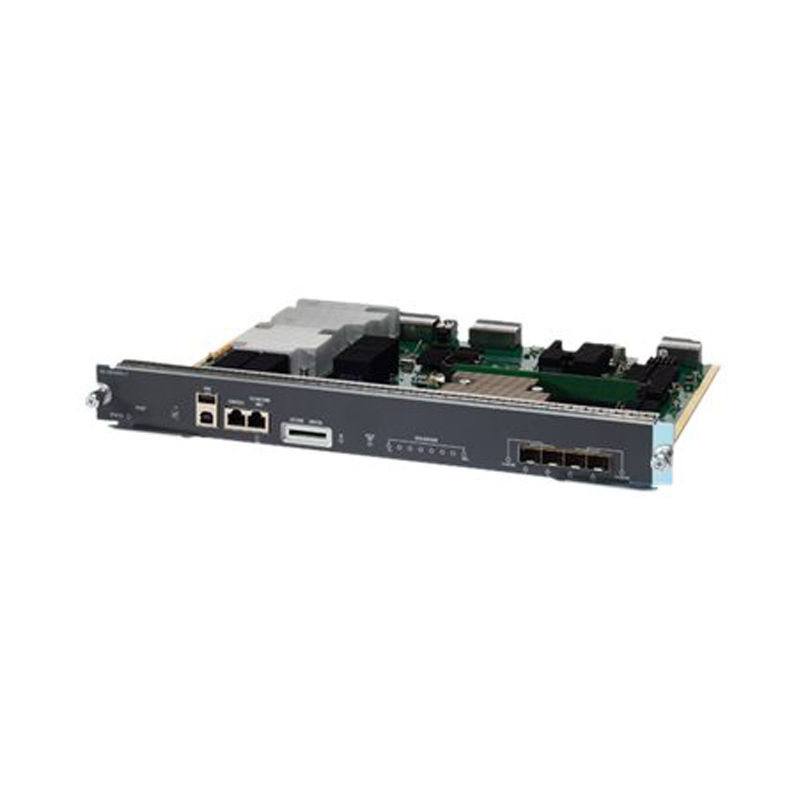
Catalyst 4500 E-Series Supervisor 8L-E, Spare
Specifications
| SD | Indicates the status of the secure digital port: Green—SD card is inserted. Off—SD card has been removed, or the SD card is bad. |
|---|---|
| LINK | Indicates the status of the 10/100/1000 BASE-T Ethernet management port: Green—The link is operational. Off—No signal is detected, or there is a link configuration failure, or the link is disabled by user. |
| Model | WS-X45-SUP8L-E= |
| SD LED | The SD LED indicates the current status of the SD memory card slot. |
| STATUS | Indicates the status of the Supervisor Engine: Green—All diagniostic tests have passed. Orange—System boot or a diagnostic test is in progress. Red—A diagnostic test failed. Off—The supervisor engine is disabled or is not powered up. |
| USB ports | USB ports are supported. |
| ACTIVE SUP | Indicates whether the Supervisor Engine is active or in standby mode: Green—Supervisor engine is active (in redundant supervisor engine configurations) Off—Supervisor engine is in standby mode (in redundant supervisor engine configurations) |
| STATUS LED | The status LED indicates the current health of the supervisor engine and the current software state. |
| UTILIZATION | When the switch is operational, the eight utilization LEDs indicate the current traffic load over the backplane as an approximate percentage value. Each LED-lit green indicates approximately 12.5 percent of load. |
| ACTIVE SUP LED | The active supervisor engine LED indicates whether the supervisor engine is active or in standby mode in redundant supervisor engine configurations. |
| UTILIZATION LEDs | Eight LEDs indicate (as an approximate percentage) the current traffic load over the backplane. |
| Uplink port LEDs | The uplink port LEDs display the status and activity of the uplink ports. |
| Uplink port active | Two LEDs on the front panel show the uplink port activity: 1-2 ACTIVE indicates that ports 1 and 2 are active 3-4 ACTIVE indicates that ports 3 and 4 are active In standalone supervisor engine configurations, all four uplink ports are active; all of the ACTIVE LEDs are lit green. In redundant supervisor engine configurations, only the 1-2 ACTIVE LED is lit green. |
| Uplink port status | Indicates the status of the uplink port: Green—The link is operational. Orange—The link is disabled by user. Flashing orange—The power-on self-test indicates a faulty port. Off—No signal is detected or there is a link configuration failure. |
| SECURE DIGITAL slot | A standard Secure Data (SD) memory card interface is provided on the front panel. |
| RESET switch (recessed) | The RESET switch is used to reset and restart the switch. |
| LINK LED (Management port) | The 10/100/1000 MGT port has a link LED associated with it. |
| CONSOLE port (RJ-45 connector) | This is a 10/100/1000 port that uses an RJ-45 connector. The console port allows you to access the switch either locally (with a console terminal) or through a modem (remote). The port has an RJ-45 connector. The console port allows you to perform the following functions: Configure the switch from the CLI Monitor network statistics and errors Configure SNMP agent parameters |
| UID LED and switch combination | A combination push button switch and LED indicator. The blue LED can be turned on either by pressing the UID switch on the front panel or through software. The main purpose of the beacon LED is to enable identification from a remote location during configuration or troubleshooting. The ability to turn on/off the LED by pressing a switch allows you to walk to the other side of a fully populated rack and identify the switch. Pressing the blue beacon LED switch toggles the beacon LED on and off. |
| 1G/10G UPLINKS (SFP/SFP+) ports. | The Supervisor Engine 8L-E has four 1-G or 10-G ports that use either small form-factor pluggable (SFP) transceivers or SFP+ transceivers. |
| 10/100/1000 MGT port (RJ-45 connector) | The Ethernet management port is a Layer 3 host port to which you can connect a PC. You can use the Ethernet management port instead of the switch console port for network management. When managing a switch, connect the PC to the Ethernet management port on a Catalyst 4500 E-series switch. |
| Warranty | 3-Year Warranty |
Key Features
- OEM Genuine Component verified by certified technicians.
- Clean serial number ready for service contract registration.
- Electrostatic Discharge (ESD) safe packaging.
- Supports hot-swapping for zero-downtime maintenance.
Frequently Asked Questions
Is this product genuine OEM?
Yes, this WS-X45-SUP8L-E=, Cisco Catalyst 4500 E-Series Supervisor, 2x10GE SFP+/1xConsole Port/Redundant Supervisor Support (WS-X45-SUP8L-E=) is 100% genuine Cisco hardware. All our products are verified by certified technicians and come with clean serial numbers ready for service contract registration.
What warranty is included?
This WS-X45-SUP8L-E=, Cisco Catalyst 4500 E-Series Supervisor, 2x10GE SFP+/1xConsole Port/Redundant Supervisor Support includes our standard 3-Year Warranty covering all manufacturing defects. We also offer advanced replacement options for minimal downtime.
How long does shipping take?
We offer free ground shipping which typically takes 3-5 business days. Expedited shipping options are available at checkout for faster delivery.
Can I return this product?
Yes, we have a 30-day return policy on all products. Restocking fees may apply for opened items. Please see our return policy for complete details.
Is the WS-X45-SUP8L-E=, Cisco Catalyst 4500 E-Series Supervisor, 2x10GE SFP+/1xConsole Port/Redundant Supervisor Support compatible with my system?
Please check the specifications tab for detailed compatibility information. Our technical team is available to assist with compatibility questions for the WS-X45-SUP8L-E=.
More in Networking
- WS-X4606-X2-E, Cisco Catalyst 4500 E-Series Linecard, 6x10GbE X2/12xSFP/TwinGig Converter
- WS-X4612-SFP-E, Cisco Catalyst 4500 E-Series Line Card, 12xGE SFP/Hot Swap/High Performance
- WS-X4624-SFP-E, Cisco Catalyst 4500 Linecard, 24xGE SFP/E-Series
- WS-X4648-RJ45V+E, Cisco Catalyst 4500 Linecard, 48xPoE+ 10/100/1000 RJ45/PoE+ Ready
- WS-X45-SUP7L-E, Cisco Catalyst 4500 Supervisor Engine, 520Gbps, VSS, E-Series
- WS-X45-SUP7-E/2, Cisco Catalyst 4500E Supervisor Engine, 848Gbps, Redundant Engine, 2 Engines
- WS-X4548-GB-RJ45, Cisco Catalyst 4500 Switch Linecard, 48x10/100/1000Base-T, RJ-45, Enhanced
- WS-X4516-10GE, Cisco Catalyst 4500 Supervisor Engine, 2x10GE X2/4x1GE SFP