Samsung SW-248BEN optical disc drive Internal White
Brand: Samsung · SKU: SW-248BEN · MPN: SW-248BEN · Category: Components
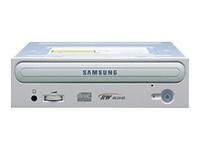
Samsung SW-248BEN, White, Tray, 8 MB, 48x, 48x, 48x. Samsung SW-248BEN optical disc drive Internal White (part number SW-248BEN) is an enterprise components product available from Server Tech Central. Key specifications include weight 770 g, internal Yes, cd read speed 40x, cd write speed 48x, product colour White, cd-r read speed 40x, cd rewrite speed 48x, cd-r write speed 48x. Every unit is fully tested and backed by our standard 3-Year Warranty, with free US ground shipping and same-day dispatch on in-stock orders. Volume pricing and Net-30 terms are available for qualified businesses, government, and education.
Specifications
| Weight | 770 g |
|---|---|
| Internal | Yes |
| CD read speed | 40x |
| CD write speed | 48x |
| Product colour | White |
| CD-R read speed | 40x |
| CD rewrite speed | 48x |
| CD-R write speed | 48x |
| CD-RW read speed | 40x |
| CD-ROM read speed | 48x |
| CD-RW write speed | 16x |
| Disc loading type | Tray |
| Dimensions (WxDxH) | 148.2 x 184 x 42 mm |
| Media types supported | CD-DA/ROM/ROM XA/Plus/Extra/Photo/Video/Enhanced/I/FMV/R/RW/TEXT |
| Drive device, buffer size | 8 MB |
| Storage temperature (T-T) | -25 - 60 °C |
| Operating temperature (T-T) | 5 - 45 °C |
| Storage relative humidity (H-H) | 10 - 90% |
| Operating relative humidity (H-H) | 10 - 80% |
| CD-ROM drive average random access time | 110 ms |
| Warranty | 3-Year Warranty |
| Weight | 770 g |
Product Description
Front: 1. Headphone Connector Connector for stereo headphones with a 3.6 mm stereo mini-jack. 2. Headphone volume control This headphone volume control adjusts the volume for your headphones. You can only use the headphone jack and volume control when you have installed the required software utilities. For example, the Microsoft Windows Media player can be used. 3. Emergency eject hole if the compartment does not open when you press the Eject button, power off the computer, insert a pin or unfolded paper clip in the hole and push firmly 4. LED Indicator Light. (GREEN: Read, RED: Record) 5. Eject button 6. Disc compartment the compartment opens and closes automatically when you press the Eject button. Rear: 1. Digital output terminal You can connect a sound card or MPEG card which support Digital output terminal to your drive using this two-pin terminal. 2. Sound output terminal You can connect a sound card to your drive using this four-pin terminal. This function is not covered in detail in this guide. Refer to the documentation supplied with your sound card. 3. Master/slave select terminal Usually, this is a pre-set configuration as illustrated below. Verify that the setting is as illustrated. If it is not, simply remove the jumper and place it in the correct position. 4. Interface terminal This input/output interface terminal is used to connect the 40-pin flat cable from the IDE interface to the CD-R/RW drive. 5. Power terminal The power terminal is a four-conductor male plug. (A : +5V DC) (B : +12V DC)
Key Features
Samsung SW-248BEN. Product colour: White, Disc loading type: Tray. Drive device, buffer size: 8 MB. CD write speed: 48x, CD rewrite speed: 48x, CD-R write speed: 48x. CD read speed: 40x, CD-R read speed: 40x, CD-RW read speed: 40x. CD-ROM drive average random access time: 110 ms
Frequently Asked Questions
Is this product genuine OEM?
Yes, this Samsung SW-248BEN optical disc drive Internal White (SW-248BEN) is 100% genuine Samsung hardware. All our products are verified by certified technicians and come with clean serial numbers ready for service contract registration.
What warranty is included?
This Samsung SW-248BEN optical disc drive Internal White includes our standard 3-Year Warranty covering all manufacturing defects. We also offer advanced replacement options for minimal downtime.
How long does shipping take?
We offer free ground shipping which typically takes 3-5 business days. Expedited shipping options are available at checkout for faster delivery.
Can I return this product?
Yes, we have a 30-day return policy on all products. Restocking fees may apply for opened items. Please see our return policy for complete details.
Is the Samsung SW-248BEN optical disc drive Internal White compatible with my system?
Please check the specifications tab for detailed compatibility information. Our technical team is available to assist with compatibility questions for the SW-248BEN.
More in Components
- Samsung SW-248F CD Writer 48x24x48 BULK optical disc drive Internal Black
- Samsung SW-248F CD Writer 48x24x48 RETAIL optical disc drive Internal White
- Samsung SW-248F CD Writer 48x24x48 RETAIL optical disc drive Internal White
- Samsung SW-252 52x32x52 EIDE int Logo+Roxio optical disc drive Internal
- Samsung SW-240BEA optical disc drive Internal
- Samsung Super-WriteMaster™ DVD Writer optical disc drive Internal Black
- Samsung Super-WriteMaster™ DVD Writer optical disc drive Internal
- Samsung Super-WriteMaster™ DVD Writer optical disc drive Internal