Contour Design Contour Multimedia Controller PRO v2
Brand: Contour Design · SKU: SPROV2 · MPN: SPROV2 · Category: Components
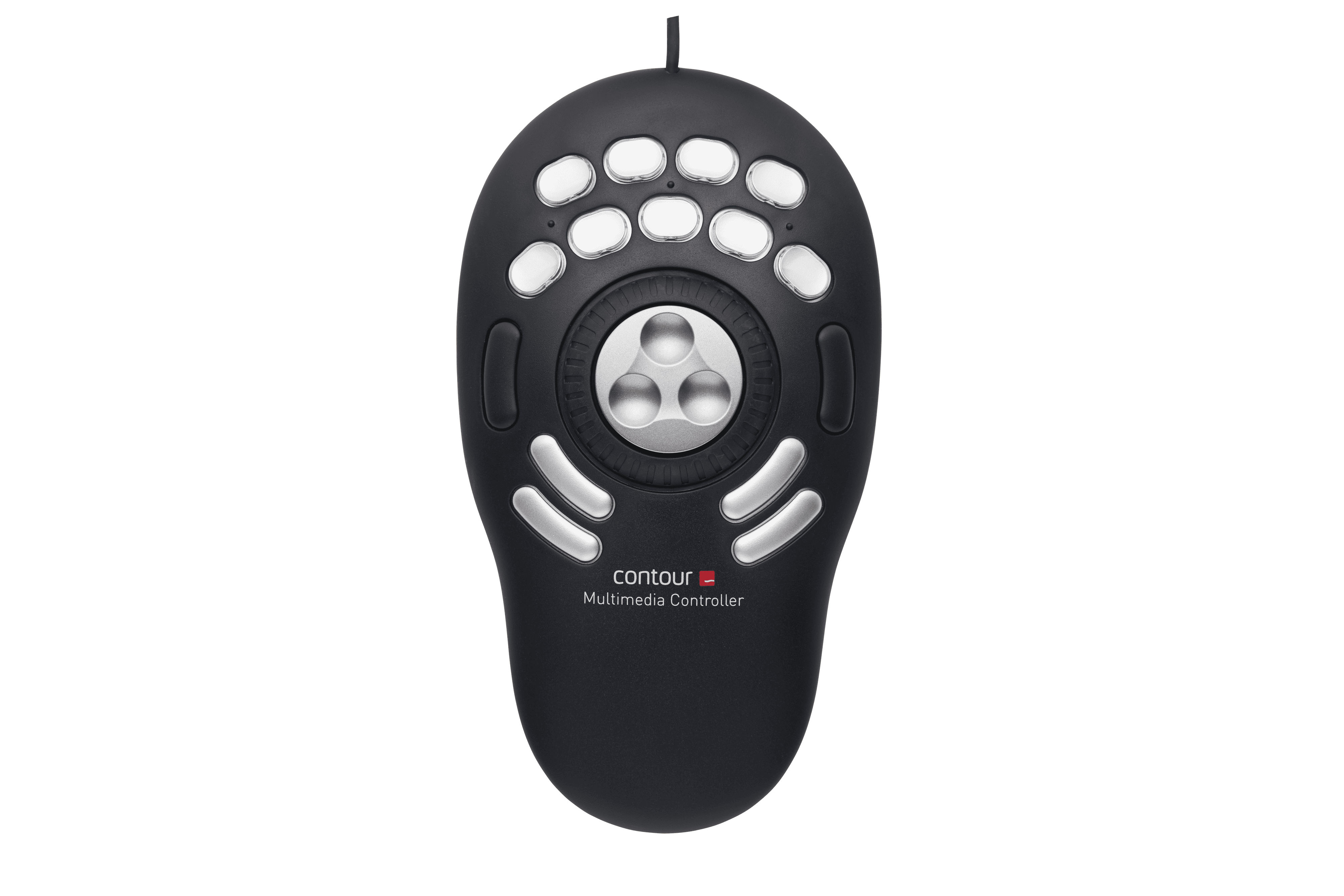
Contour Design Contour Multimedia Controller PRO v2, USB, Black, Silver, Music editing, Photo editing, Video editing, Button, Jog dial, 109 mm, 196 mm. Contour Design Contour Multimedia Controller PRO v2 (part number SPROV2) is an enterprise components product available from Server Tech Central. Key specifications include depth 196 mm, width 109 mm, height 29 mm, weight 250 g, interface USB, control type Button, Jog dial, package depth 230 mm, package width 130 mm. Every unit is fully tested and backed by our standard 3-Year Warranty, with free US ground shipping and same-day dispatch on in-stock orders. Volume pricing and Net-30 terms are available for qualified businesses, government, and education.
Specifications
| Depth | 196 mm |
|---|---|
| Width | 109 mm |
| Height | 29 mm |
| Weight | 250 g |
| Interface | USB |
| Control type | Button, Jog dial |
| Manufacturer | Contour Design |
| Package depth | 230 mm |
| Package width | 130 mm |
| Package height | 50 mm |
| Package weight | 300 g |
| Product colour | Black, Silver |
| Built-in display | No |
| Country of origin | China |
| Packaging content | Multimedia Controller,USB-C to USB-A adapter,user guide,stickers |
| Programmable buttons | Yes |
| Suitable for actions | Music editing, Photo editing, Video editing |
| Compliance certificates | CE |
| Product recycled content | 45% |
| Master (outer) case width | 253 mm |
| Master (outer) case height | 285 mm |
| Master (outer) case length | 278 mm |
| Master (outer) case volume | 0.0907 cm³ |
| Packaging recycled content | 70% |
| Warranty | 3-Year Warranty |
| Weight | 250 g |
| Dimensions | 109 mm x 196 mm x 29 mm |
Product Description
Take control of your multimedia work. Single-handedly. The Contour Multimedia Controller PRO v2 multi-media controller will maximize your audio and video editing, graphic design, or other shuttle and jog productivity with both ideal form and function. Pre-configured for many of the industry’s leading audio and video editing applications, 15 customizable buttons will make working amazingly fast and precise by utilizing commonly used macros. Contour Multimedia Controller PRO v2 for Video Editors Whether you’re in an NLE like Adobe Premiere or Davinci Resolve, or visual effects software such as Adobe After Effects or Motion our Contour Multimedia Controller PRO v2 will allow you to elevate your editing workflow. Unprecedented Control Our bespoke jog/shuttle wheel design is a throwback to reel-to-reel analog control editing. With a spring loaded outer shuttle ring that allows users to move the playhead through the timeline at variable speeds. Pair this with an our jog dial that gives users frame by frame control, and you will never have to waste time looking for the perfect spot to make an edit again. Buttons for Every Function The Contour Multimedia Controller PRO v2 comes equipped with 15 buttons that, once our driver is downloaded and installed, has preset keyboard shortcuts built in for over 100 software programs – Including everything an editor needs. Would you like to know if our driver comes with presets for the software you prefer? Your Contour Multimedia Controller PRO v2, Your Workflow Although our driver comes with presets for all of your favorite software, no one knows your workflow better than you! That is why we made an intuitive driver that allows our users to customize the entire button layout of the Contour Multimedia Controller PRO v2 to perfectly match the way you work. AppDetection The Contour Multimedia Controller PRO v2 driver is able to see the active window on your computer, and will automatically switch the preset shortcuts to match whatever program you are in without ever having to interrupt your workflow. Contour Multimedia Controller PRO v2 for Music Applications The Contour Contour Multimedia Controller PRO v2 is well-known in the video editing community, but it’s not the first thing that comes to mind when you’re trying to streamline your music production workflow. If you’re not familiar with the Contour Multimedia Controller PRO v2 , it’s a table top input device, connected via USB, and devoted to scrolling, navigation, and keyboard shortcuts, courtesy of a jog/shuttle wheel, and 15 buttons. There is a level of immediate support for music software, thanks to the supplied presets for Apple’s Logic Pro X, GarageBand, and MainStage, as well as other popular music applications such as Ableton Live, Audacity, Bitwig Studio, Reaper, DJ-1800, Izotope RX, Digital Performer, Studio One, Reason, Reaktor, and Traktion. A free editor application gives complete control over the Contour Multimedia Controller PRO v2 assignments, so you can use the dial and buttons for keystrokes, scrolling, clicking, opening files or folders, or for selected system commands such as volume and display brightness. For each keystroke you can add modifiers – ctrl, option, shift, or cmd, then enter a qwerty character, or a function key, or a system key such as tab or enter. If you’re already aware of the benefits of using your DAW’s keyboard shortcuts, this should already be planting little idea-seeds in your head! I’m an Ableton Certified Trainer, and my entire day is spent with Live-related activities – running classes, creating videos, writing tutorials, and the like, so naturally, here I’m using Live as my set-up example. Not everybody uses Live(!), but hopefully it’ll give you some inspiration about how you can use the Contour Multimedia Controller PRO v2 with your own favourite DAW. As I’ve already mentioned, there’s an Ableton Live preset included in the Contour editor application, but I decided to create my own assignments instead. Live has a fixed array of keyboard shortcuts, which aren’t user-editable, but what makes all the difference is the fact that Live also has something called Key Map Mode, where you can assign qwerty characters to many of Live’s functions, including transport controls, clip launching, software instrument parameters, and so on. This means that we can go deep with our chosen assignments for the Contour Multimedia Controller PRO v2 (and if necessary you can save more than one set of assignments for the same DAW, perhaps for studio and performance use). I set it up with buttons toggling the Browser, Detail View, Session/Arrangement View, and Mixer. Other buttons were put to work for Stop Clips, scene launching, and effect activation, while the wheel was used to scroll up and down through scenes in Live’s Session View. For more complex tasks, the Contour Multimedia Controller PRO v2 can send macros – entire chains of key commands and characters – from one button push. Imagine combining th
Key Features
Contour Design Contour Multimedia Controller PRO v2. Interface: USB, Product colour: Black, Silver, Suitable for actions: Music editing, Photo editing, Video editing. Width: 109 mm, Depth: 196 mm, Height: 29 mm. Packaging content: Multimedia Controller,USB-C to USB-A adapter,user guide,stickers. Country of origin: China, Products per master (outer) case: 10 pc(s), Master (outer) case gross weight: 4 kg. Manufacturer: Contour Design
Frequently Asked Questions
Is this product genuine OEM?
Yes, this Contour Design Contour Multimedia Controller PRO v2 (SPROV2) is 100% genuine Contour Design hardware. All our products are verified by certified technicians and come with clean serial numbers ready for service contract registration.
What warranty is included?
This Contour Design Contour Multimedia Controller PRO v2 includes our standard 3-Year Warranty covering all manufacturing defects. We also offer advanced replacement options for minimal downtime.
How long does shipping take?
We offer free ground shipping which typically takes 3-5 business days. Expedited shipping options are available at checkout for faster delivery.
Can I return this product?
Yes, we have a 30-day return policy on all products. Restocking fees may apply for opened items. Please see our return policy for complete details.
Is the Contour Design Contour Multimedia Controller PRO v2 compatible with my system?
Please check the specifications tab for detailed compatibility information. Our technical team is available to assist with compatibility questions for the SPROV2.
More in Components
- Contour Design Contour Multimedia Controller, Xpress
- Contour Design RollerMouse Red
- Contour Design STREAM keyboard Office USB QWERTZ German Black
- Contour Design Unimouse Right-Handed Wireless
- Contour Design Active Key Contour QuickClean Medical Mouse IP68 Scroll Sensor Wireless White PMH3
- Contour Design Active Key Contour QuickClean Medical Mouse IP68 Scroll Sensor Wireless Black PMH3
- Contour Design Active Key Contour QuickClean Medical Mouse IP68 Scroll Sensor Wired White PMH3
- Contour Design Active Key Contour QuickClean Medical Mouse IP68 Scroll Sensor Wired Black PMH3