DELL PowerEdge 2161AD KVM switch Rack mounting Black
Brand: DELL · SKU: PE2161AD · MPN: PE2161AD · Category: Data Center
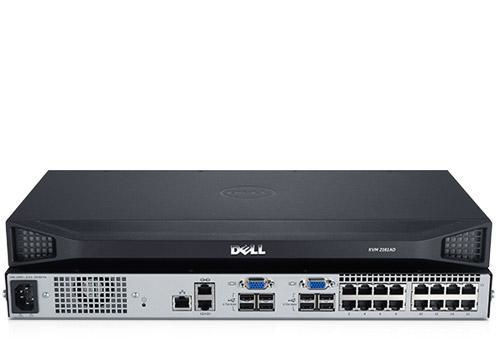
DELL PowerEdge 2161AD, 1600 x 1200 pixels, Ethernet LAN, Rack mounting, 20 W, 1U, Black. DELL PowerEdge 2161AD KVM switch Rack mounting Black (part number PE2161AD) is an enterprise kvm switches product available from Server Tech Central. Key specifications include depth 279.4 mm, width 431.8 mm, height 44.5 mm, weight 3.2 kg, ethernet lan Yes, input voltage 100-240 V, rack capacity 1U, rack mounting Yes. Every unit is fully tested and backed by our standard 3-Year Warranty, with free US ground shipping and same-day dispatch on in-stock orders. Volume pricing and Net-30 terms are available for qualified businesses, government, and education.
Specifications
| Depth | 279.4 mm |
|---|---|
| Width | 431.8 mm |
| Height | 44.5 mm |
| Weight | 3.2 kg |
| Ethernet LAN | Yes |
| Input voltage | 100-240 V |
| Rack capacity | 1U |
| Rack mounting | Yes |
| Product colour | Black |
| Mouse port type | USB |
| Video port type | VGA |
| Built-in display | No |
| Power supply type | AC |
| AC input frequency | 50 - 60 Hz |
| Cabling technology | 10/100Base-T(X) |
| Keyboard port type | USB |
| Maximum resolution | 1600 x 1200 pixels |
| Security algorithms | 128-bit AES, 3DES, DES |
| Networking standards | IEEE 802.3, IEEE 802.3u |
| USB 2.0 ports quantity | 8 |
| Connectivity technology | Wired |
| Storage temperature (T-T) | -20 - 70 °C |
| Ethernet LAN (RJ-45) ports | 19 |
| VGA (D-Sub) ports quantity | 2 |
| Warranty | 3-Year Warranty |
| Weight | 3.2 kg |
| Dimensions | 431.8 mm x 279.4 mm x 44.5 mm |
Product Description
Securely manage your data center Manage multiple servers from one console with the Dell™ KVM 2161AD server console switch and opt for a Remote Access Key for remote access via any TCP/IP network. - Enjoy easy, tool-free installation using the Dell™ ReadyRails™ mounting interface; - Virtual Media support allows servers to access storage media attached to the KVM, enabling out-of-band file transfers and OS patch deployments; - Remote access is secure and can be disabled by simply unplugging the optional Remote Access Key from one of the KVM's USB ports. Simplify your server management Maximize your business resources with Dell™ KVM server console switches which: - Support Virtual Media; - Enable multifactor authentication via support for Common Access Cards (CAC); - Provide encrypted remote access when enabled by the optional Remote Access Key. Choose from a number of options to connect to the Dell KVM 2161AD: - Local port’s video head directly on the switch; - Analog Console Interface (ACI) connection in a tiered configuration; - Avocent DSView® 3 management software compatible with the appropriate plug-in; - Optional Remote Access Key plugged into one of the local USB ports. The optional Remote Access Key delivers: - Remote access session through the Onboard Web Interface (OBWI) or RCS software - 128-bit SSL, DES, 3DES and AES encryption - IPv4 (DHCP) or IPv6 (DHCPv6 and stateful auto-configuration) access - 10/100 Mbps network interface Feature improvements The Dell KVM 2161AD includes support for high-resolution widescreen video, as well as support for Common Access Card (CAC) capability for smart cards over USB and four USB 2.0 ports. - Performance you need: Improved 16:10 and 4:3 video display, field-upgradable firmware and seamless integration with Dell servers and accessories; - Security you depend on: CAC support with encryption for smart cards; - Improved productivity you want: At-the-rack access anytime, remote patches and upgrades can be made using Virtual Media and the optional Remote Access Key. KVM 2161AD - Flexible and scalable The Dell™ KVM 2161AD can grow with your business, helping to manage up to 256 servers from one unified console when tiered with additional Dell 16-port KVM console switches. - Add remote access: You can install software and perform upgrades for your data center remotely with the optional Remote Access Key; - Server Interface Pods (SIPs): The Dell KVM 2161AD is compatible with the following SIPs: PS/2, USB 1.1, USB 2.0 with Virtual Media support and USB 2.0 with Virtual Media/Common Access Card (CAC) support; - Easy installation: Be ready in seconds. With Dell™ ReadyRails™ mounting interface, you get tool-free installation for the 1U rack space. The KVM can be mounted in the front or rear of the rack and comes with a blanking panel to prevent recirculation of exhaust from other rack equipment. Can be mounted in 0U rack space as well; - Peace of mind: The Dell KVM 2161AD supports Dell and third-party servers, and includes the technical support and hardware warranty1 service you need to stay up and running. Maximum connectivity The Dell KVM 2161AD has 16 analog rack interface (ARI) ports for connecting to SIPs attached to servers. - Four SIPs (PS/2, USB, USB2 Virtual Media, and USB2 Virtual Media + CAC) are available to address a variety of connectivity needs for servers; - One SIP can replace a bulky keyboard/video/mouse (KVM) cable by converting the signals and driving them up to 50 feet through a single CAT 5 cable without signal degradation. The SIP cable draws power from the server, and it’s designed to keep the server working properly even if the Dell KVM connection is broken. KVM 2161AD - Easy to manage Manage your data center using the Dell RCS software or the onboard Web interface (OBWI) with the optional Remote Access Key. - RCS software is a cross-platform management application that enables you to view and control the Dell KVM and all attached servers. It provides secure switch-based authentication, data transfers and username/password storage; - The OBWI provides similar management functions as the RCS software. It’s launched directly from the switch through a Web browser, and any servers connected to the RCS are automatically detected. The Dell KVM comes ready to use with Dell RCS software and is compatible with Avocent DSView® 3 management software.
Key Features
DELL PowerEdge 2161AD. Keyboard port type: USB, Mouse port type: USB, Video port type: VGA. Cabling technology: 10/100Base-T(X), Networking standards: IEEE 802.3, IEEE 802.3u, Security algorithms: 128-bit AES, 3DES, DES. Maximum resolution: 1600 x 1200 pixels. Product colour: Black, Rack capacity: 1U. Input voltage: 100-240 V, AC input frequency: 50 - 60 Hz, Power consumption (typical): 20 W
Frequently Asked Questions
Is this product genuine OEM?
Yes, this DELL PowerEdge 2161AD KVM switch Rack mounting Black (PE2161AD) is 100% genuine DELL hardware. All our products are verified by certified technicians and come with clean serial numbers ready for service contract registration.
What warranty is included?
This DELL PowerEdge 2161AD KVM switch Rack mounting Black includes our standard 3-Year Warranty covering all manufacturing defects. We also offer advanced replacement options for minimal downtime.
How long does shipping take?
We offer free ground shipping which typically takes 3-5 business days. Expedited shipping options are available at checkout for faster delivery.
Can I return this product?
Yes, we have a 30-day return policy on all products. Restocking fees may apply for opened items. Please see our return policy for complete details.
Is the DELL PowerEdge 2161AD KVM switch Rack mounting Black compatible with my system?
Please check the specifications tab for detailed compatibility information. Our technical team is available to assist with compatibility questions for the PE2161AD.
More in Data Center
- DELL PowerEdge 2162DS KVM switch Black
- DELL PowerEdge 2420 power rack enclosure 24U Floor Black
- DELL PowerEdge 2420 power rack enclosure 24U Floor Black
- DELL PowerEdge 2420 power rack enclosure 24U Floor Black
- DELL PowerEdge 1082DS KVM switch Rack mounting Black
- DELL PowerEdge 1081AD KVM switch Rack mounting Black
- Dell K558N 6020 Basic Rack Power Distribution Unit PDU
- Dell H41R2 Remote KVM Console Switch 2162DS