Zyxel NPS-520 MFP print server Ethernet LAN
Brand: Zyxel · SKU: 91-014-020005B · MPN: 91-014-020005B · Category: Servers
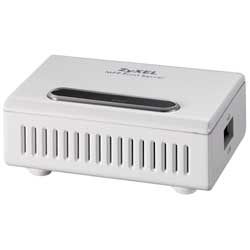
Zyxel NPS-520 MFP Print Server, Ethernet LAN, CE. FCC 15B, C-tick, 62 g, 0 - 50 °C, 76.5 x 57 x 25 mm, 7 VDC/0.5 A. Zyxel NPS-520 MFP print server Ethernet LAN (part number 91-014-020005B) is an enterprise servers product available from Server Tech Central. Key specifications include weight 62 g, interface USB 2.0, RJ-45, certification CE. FCC 15B, C-tick, power supply type 7 VDC/0.5 A, dimensions (wxdxh) 76.5 x 57 x 25 mm, usb 2.0 ports quantity 1, network connection type Ethernet LAN, ethernet lan (rj-45) ports 1. Every unit is fully tested and backed by our standard 3-Year Warranty, with free US ground shipping and same-day dispatch on in-stock orders. Volume pricing and Net-30 terms are available for qualified businesses, government, and education.
Specifications
| Weight | 62 g |
|---|---|
| Interface | USB 2.0, RJ-45 |
| Certification | CE. FCC 15B, C-tick |
| Power supply type | 7 VDC/0.5 A |
| Dimensions (WxDxH) | 76.5 x 57 x 25 mm |
| USB 2.0 ports quantity | 1 |
| Network connection type | Ethernet LAN |
| Ethernet LAN (RJ-45) ports | 1 |
| Operating temperature (T-T) | 0 - 50 °C |
| Compatible operating systems | - Microsoft Windows 98 (SE), Windows 2000, Windows XP, Windows ME, Windows 2003 - Unix/Linux - MAC OS |
| Non-operating relative humidity (non-condensing) | 20 - 95% |
| Warranty | 3-Year Warranty |
| Weight | 62 g |
Product Description
Best Partner of Your Multi-Function Printer - Share a printer without sharing your PC to Multiple Users. - Compatible with Multi-Function Printers. - Auto-connected Print Job at Any Time. - Real time Ink and Paper Status Monitoring. - Easy Installation with Multilingual Support. Supports Latest MFP and Older Printers With print, fax, scan and card reader features in one machine, multi-function printers (MFP) enable SOHO/home users to enjoy the all-in-one convenience at a low budget. As most MFPs come with only USB connectors and are not network-ready, ZyXEL's NPS-520 MFP print server can be used to add USB and Ethernet interfaces. A MFP or printer connected to the NPS-520 MFP print server is available to all network users without a dedicated PC as the printer spooler. Fast Setup and Auto Printing It takes less than 5 minutes to setup an NPS-520. With "Auto Connect" and "Auto Release" functions activated, all users on the network can access the MFP and printer easily without extra wiring. This is a perfect solution for home or other low-budget network users. Small, Portable and Slick Design Designed for home offices with limited space, the compact NPS-520 has slick exterior and comes with wall-mounting housing design for your convenience. On hot spots or other places where printer sharing is needed, the portable design of NPS-520 offers a transparent solution to users; and since it's as small as a power adapter, users can even carry it effortlessly when traveling. Printer Sharing for Windows, Mac OS, UNIX and Linux In addition to Windows, the NPS-520 also enables printer sharing among different operating systems like Mac OS, UNIX and Linux. Users can take advantage of their favorite applications freely on different platforms and enjoy printer sharing that NPS-520 offers.
Key Features
Zyxel NPS-520 MFP Print Server. Network connection type: Ethernet LAN. Certification: CE. FCC 15B, C-tick. Weight: 62 g. Dimensions (WxDxH): 76.5 x 57 x 25 mm, Power supply type: 7 VDC/0.5 A, Compatible operating systems: - Microsoft Windows 98 (SE), Windows 2000, Windows XP, Windows ME, Windows 2003 - Unix/Linux - MAC...
Frequently Asked Questions
Is this product genuine OEM?
Yes, this Zyxel NPS-520 MFP print server Ethernet LAN (91-014-020005B) is 100% genuine Zyxel hardware. All our products are verified by certified technicians and come with clean serial numbers ready for service contract registration.
What warranty is included?
This Zyxel NPS-520 MFP print server Ethernet LAN includes our standard 3-Year Warranty covering all manufacturing defects. We also offer advanced replacement options for minimal downtime.
How long does shipping take?
We offer free ground shipping which typically takes 3-5 business days. Expedited shipping options are available at checkout for faster delivery.
Can I return this product?
Yes, we have a 30-day return policy on all products. Restocking fees may apply for opened items. Please see our return policy for complete details.
Is the Zyxel NPS-520 MFP print server Ethernet LAN compatible with my system?
Please check the specifications tab for detailed compatibility information. Our technical team is available to assist with compatibility questions for the 91-014-020005B.
More in Servers
- Zyxel NPS-520 print server Ethernet LAN
- Zyxel NSA210 1-Bay Digital Media Server 0 TB
- Zyxel NSA310S Storage server Tower 0.256 GB 0 TB Black
- Zyxel Vantage Radius 50 Wireless LAN Authentication Server gateway/controller
- Zyxel NPS-520 MFP print server Ethernet LAN
- Zyxel NPS-520 MFP print server Ethernet LAN
- Zebra ZebraNet Internal print server Ethernet LAN
- Zebra ZebraNet II print server Ethernet LAN